


My Manpower – Job Search
3.3124.00 Reviews
App Specs
- Version
- 7.5.1
- Updated On
- License
- Free
- Downloads
- 500,000+
- Developer
- Manpower Mobile
- Categories
- Business
- Platform
- Android, iOS
Screenshots
 Analysis by AppCompare
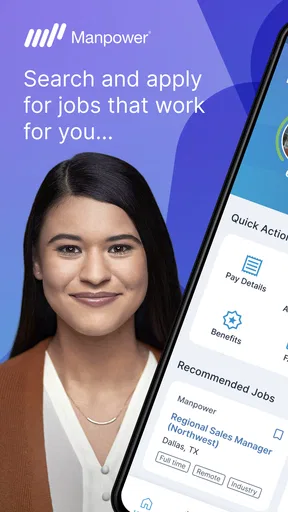
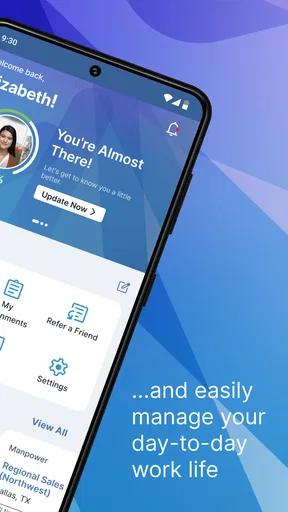
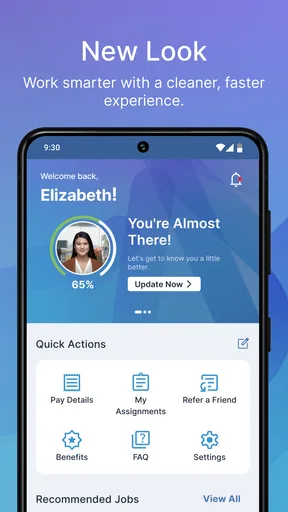
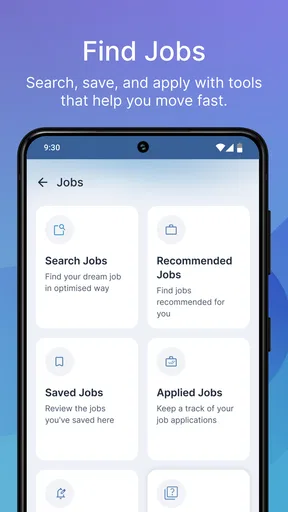
I approached My Manpower as a practical career app rather than a general job board, and that distinction matters. It is a free business app from Manpower Mobile, built around the idea that your next work opportunity should be manageable from a phone. The store summary says “Your career starts here,” while the shorter description presents it simply as “My Manpower.” In daily use, I found the most useful way to think about it is as a mobile doorway into Manpower’s recruitment experience, especially for people who want to search or manage career-related steps without sitting at a computer.
That focus gives the app a clear audience, but it also sets expectations. It is not a broad professional network, a learning platform, or a replacement for every employment service. Its value depends on how well its recruitment tools fit your particular situation, how comfortably you can navigate a mobile interface, and whether Manpower opportunities match the kind of work you want. I also paid close attention to readability, physical interaction, sensory load, and the moments when using a phone for a job search becomes inconvenient.
How the app feels to navigate and read
The first impression is fairly direct: this is an employment tool, so the important path should be finding relevant work and moving through the next step without unnecessary distraction. That simplicity is helpful for someone opening the app with a specific goal, such as checking available roles during a commute or looking for a new assignment after work. I prefer this focused approach to a crowded career app that mixes articles, networking posts, promotional material, and unrelated recommendations.
For readability, the biggest advantage is the limited purpose of the product. A person who already understands why they are opening it can concentrate on job-related information instead of learning a complicated professional ecosystem. I recommend reading each listing slowly, though. Job titles can sound similar, and the difference between a suitable position and a poor match may be hidden in the practical details: location, schedule, experience expectations, or the type of employment arrangement.
People with low vision may find a phone-based job search easier when the device’s own text enlargement and display settings are comfortable for them. Those settings are especially useful when a listing contains several pieces of information close together. I would not assume that enlarging text solves everything, because larger system text can sometimes make buttons, labels, or longer descriptions require more scrolling. The sensible approach is to adjust the phone before beginning a serious application session, then check whether the whole page remains understandable rather than judging readability from one screen.
Navigation also benefits from a deliberate routine. I would begin by searching or browsing, open only the roles that genuinely fit, and keep a short note of the ones worth revisiting. That prevents the common mobile mistake of opening many similar listings and losing track of which one had the better schedule or requirements. If the app allows you to move between a listing and an application step, I would pause before leaving a page and make sure I understand what information the next step expects.
One less obvious point is that accessibility is not only about font size. Clarity depends on wording, spacing, contrast, and whether the app makes the current step obvious. Recruitment language can already be stressful, particularly for a first-time applicant or someone returning to work. A screen that technically contains all the information can still be difficult if the user has to interpret unfamiliar terms or hunt for the action that matters. I found that the app works best when I treat each listing as a small decision document rather than quickly swiping through it like a social feed.
Worth Reading Before You Choose

Baby Panda World Brings Quick Play to Modern Phones, but Its Game Library Feels Busy

ESPN’s Live Game View Makes Following Close Games Easier

QuizzLand Review: A Good Fit for Short Trivia Breaks, Not Every Player

Basketball Stars: Multiplayer Is Fast, but Can It Recover When Matches Go Wrong?

WEBTOON Turns Phone Updates Into a Better Reading Routine

Link to Windows Runs on Shared Habits, Not Social Feeds
Making a job search manageable on a small screen
A useful workflow is to separate discovery from commitment. On the first pass, I would look only for roles that meet the non-negotiables: acceptable travel, workable hours, and a realistic match for my experience. On the second pass, I would reread the promising listings and prepare the information needed for the application. This is more accessible for people who tire quickly when reading dense screens, because it avoids trying to compare every detail while also completing forms.
The approach is also helpful for users who process information more slowly. Instead of treating speed as a virtue, I would use the app as a checklist: identify the role, confirm the practical fit, review the wording, and only then continue. That may feel less efficient than rapid browsing, but it reduces the chance of applying for the wrong position or overlooking an important condition.
For users who rely on screen readers or other assistive technology, the quality of the experience will depend heavily on how the app’s controls and text are exposed by the phone. I would test the main journey before investing time in a long application. Can you reach a listing, understand its key details, move to the next action, and return without losing your place? If that basic route is awkward, the app may become frustrating even if the jobs themselves are relevant.
This is where the product’s focused nature can work both ways. A narrow purpose makes it easier to learn the general flow, but employment forms are high-stakes enough that a small navigation problem matters. If a label is unclear or a control is difficult to activate, the user may not know whether the issue is a mistake, an incomplete field, or simply the app’s design. I would keep the app updated and use the latest available version, which is 7.5.1, but I would still verify important information before submitting anything.
Motor, sensory, and situational access
Physical interaction is a major part of any mobile job-search experience. People with limited dexterity, tremors, repetitive strain, or one-handed use may find long sessions tiring. My advice is to avoid treating the app as something you must finish in one sitting. Search when you have time, stop before fatigue affects accuracy, and return later to complete the next step. A short, careful session is safer than repeatedly tapping through a form while uncomfortable.
Voice input can be useful for drafting information or reducing typing, depending on the phone and the field being completed. I would review every dictated entry, especially names, addresses, job titles, and dates, because speech recognition can misunderstand employment terminology. Users who cannot comfortably perform small touch gestures should also consider the phone’s built-in touch accommodations. These are not special features of the app, but they can change whether a mobile recruitment process feels possible.
For people who are sensitive to bright screens, motion, or busy visual layouts, the best experience will probably come from using the app in a calm display mode and avoiding rushed browsing. Job hunting already carries emotional pressure, and a visually demanding screen can make that pressure worse. I found it more productive to read listings in a quiet place, with notifications and unrelated apps out of the way, rather than attempting to compare roles in a noisy environment.
Users with hearing loss should not have to depend on audio alone to understand a job-search step. In practical terms, I would look for written instructions and visible confirmation whenever moving forward. If an important message appears only briefly or relies on sound, that creates an unnecessary barrier. The same principle applies to anyone working in a place where audio cannot be used, such as a shared office, public transport, or a waiting room.
Situational access is just as important as permanent disability. Imagine someone who has a short break at work and wants to check whether a new opportunity is available. They may be standing, using one hand, dealing with glare, and unable to listen to audio. In that situation, the app is most useful when the user can identify relevant roles quickly and postpone detailed reading until later. I would not recommend completing a sensitive application in that setting; a stable connection, privacy, and enough concentration are more important than speed.
Another realistic case is a parent searching after the household has gone quiet. The user may need low-noise interaction, larger text, and the ability to stop immediately when interrupted. A mobile career app is naturally better suited to this fragmented schedule than a desktop-only process, but that does not mean every step will be equally comfortable on a small screen. My practical tip is to prepare commonly needed information in an accessible note, while still checking that each application field asks for what you expect before pasting anything.
People with cognitive disabilities or attention difficulties may benefit from reducing the number of open choices. I would choose a single search intention at a time: a particular type of role, a manageable area, or a preferred schedule. Comparing too many listings can turn a useful tool into an exhausting one. The app is more approachable when I use it as a series of small decisions instead of an endless search for the perfect job.
Where the experience still creates friction
The main limitation is that a recruitment app cannot remove the complexity of recruitment itself. Even a clean screen may lead to detailed questions, unfamiliar wording, or decisions that require information from a résumé and previous employment records. For someone with limited energy, dyslexia, memory difficulties, or anxiety around forms, the hardest part may begin after finding a suitable vacancy. I would keep supporting documents and personal details organized before starting, and I would take screenshots or notes of essential listing information only where that is appropriate and safe.
Privacy is another practical concern. Job applications involve personal information, so I would avoid completing them on a shared device or an open public network when possible. I would also check every field before submission and make sure the account or contact details belong to me. This is not a criticism unique to My Manpower; it is a reason to treat a career app differently from a casual browsing app.
The app may not be the right choice for someone who wants a complete view of the entire employment market. Since it is tied to Manpower’s recruitment context, a general job board may offer broader coverage across employers and agencies. Likewise, a professional networking service may be better for building contacts, displaying a portfolio, or researching companies. I would use My Manpower when the relevant opportunity is likely to be within Manpower’s ecosystem, not as my only source of career information.
It is also worth setting realistic expectations about ratings. The app has an average rating of 3.3 from around 2.8 thousand ratings, with 124 written reviews, so the public response is mixed rather than universally enthusiastic. That does not tell me whether the app will work perfectly for one person, but it does suggest that users should judge it by their own recruitment needs and test the essential path early. If searching is easy but the application stage is difficult on your device, a browser or another recruitment channel may be the better fallback.
The broad adoption is still meaningful: My Manpower has passed 500 thousand installs, which indicates that it is not an obscure experiment. It is free to install and carries an Everyone age rating, making it approachable for a wide audience. Those facts make trying it low-risk from a purchase perspective, but they do not guarantee that every role, form, or screen will suit every ability. Accessibility is experienced individually, and I would rather test the actual task than rely on a label.
Device compatibility is another point to check before planning around the app. It requires Android 9 or later, so users on older Android phones may need a different route to Manpower services. For people who depend on an older device because it has familiar accessibility settings, this requirement can be more significant than it first appears. A free app is not truly convenient if the user must replace a working phone to access it.
I also would not assume that the newest version automatically resolves every personal barrier. Version 7.5.1 is the current release, and keeping software current is sensible for stability, but users should still confirm that text scaling, assistive controls, keyboard behavior, and navigation work on their own handset. If a critical step fails, contacting the relevant recruitment support route or using a conventional browser may be more practical than repeatedly retrying the same mobile action.
Who will get the most from it
I think My Manpower is strongest for people who want a direct, mobile-first way to explore Manpower opportunities. It suits an applicant who already knows the kind of work they want, prefers short sessions, and is comfortable reviewing listings on a phone. It can also help someone whose schedule makes desktop browsing inconvenient: a person between shifts, a commuter with time to spare, or a job seeker managing applications around family responsibilities.
It is less suitable as the sole tool for someone who needs extensive career guidance, portfolio presentation, networking, or a market-wide comparison of employers. If you are still deciding on a career direction, a career counseling service or broader professional platform may offer more context. If you need highly specialized accessibility support, I would first test the main workflow with your preferred assistive setup and keep a non-app alternative available.
Compared with a traditional desktop recruitment website, the app’s advantage is convenience. A phone is usually close at hand, and a focused interface can make checking opportunities feel less like an administrative project. Compared with a general job-board app, its trade-off is scope: the Manpower connection may be exactly what you want, but it is not the same as searching every possible source in one place. Compared with email or in-person recruitment, the app offers more independence, yet it also puts more responsibility on the user to read carefully and track progress.
My best practical recommendation is to use it as one part of a structured search. Set aside a quiet session to learn the navigation, adjust your phone’s display and input settings, and test whether you can read a complete listing comfortably. Then use short follow-up sessions for discovery and longer sessions only when you are ready to apply. Keep a record of roles that interest you, but do not rely on memory when several listings have similar titles.
For inclusive use, the most important question is not whether the app looks simple at first glance. It is whether you can complete the specific action you need without pain, confusion, excessive scrolling, or dependence on sound. That includes reading the listing, understanding the requirements, moving through the application, correcting mistakes, and knowing what happened afterward. If any of those steps repeatedly blocks you, switching to another channel is a sensible decision rather than a personal failure.
Overall, I see My Manpower as a useful and approachable recruitment companion, especially for people whose career search already aligns with Manpower and who value mobile access. Its free entry point, Everyone age rating, focused purpose, and availability on supported Android devices make it easy to try. The mixed public rating reminds me to keep expectations practical, while the accessibility questions mean I would test it personally rather than assume it fits every user.
My inclusive verdict is positive with an important condition: choose it for focused Manpower job searching, not as a universal career platform. I would recommend it to a friend who wants a convenient way to explore relevant openings and can comfortably manage mobile reading and forms. I would also tell that friend to adjust the phone first, work in short sessions, verify every application detail, and keep a browser or broader job service as a backup. Used that way, the app can make career searching more reachable without pretending that a phone screen solves every barrier.
Pros
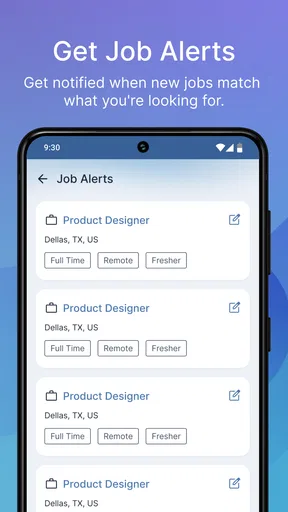
- Search filters make it easier to narrow down suitable vacancies.
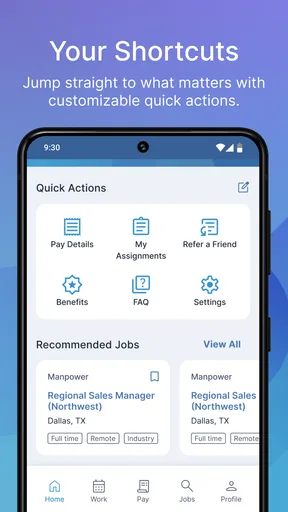
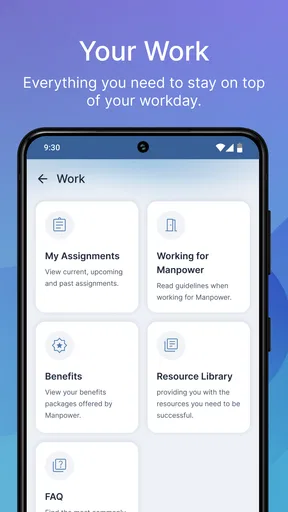
- Users can manage applications and track their recruitment progress in one place.
- Job listings may include useful details about roles
- locations
- and requirements.
- The app can support job searches across multiple Manpower markets.
- A mobile format makes checking new opportunities convenient while traveling.
Cons
- Available vacancies depend heavily on your country and local Manpower branch.
- Some positions may require creating an account before applying.
- Recruitment response times can vary and are outside the app’s control.
- The number of listings may be limited in smaller cities or regions.
- Some features may work differently depending on the operating system or market.
FAQs for My Manpower – Job Search
What is My Manpower – Job Search, and what can I use it for?
My Manpower – Job Search is a recruitment and employment app designed to help users discover job opportunities, manage applications, and stay connected with Manpower services. Depending on your location, you may be able to search vacancies by role, industry, location, or employment type, create or update a candidate profile, upload a résumé, and receive communication about suitable positions.
Do I need to create an account before searching for jobs?
You may be able to browse available vacancies without completing a full registration, but an account is generally required to apply for positions and manage your candidate information. Creating a profile can also make applications faster because your contact details, résumé, work history, and preferences may be stored for future opportunities. Available features can vary by country.
Is My Manpower – Job Search available in every country?
The app’s availability, job listings, languages, and recruitment features depend on the Manpower organization operating in your region. Some countries may offer a complete mobile experience, while others may direct users to a local website or provide fewer functions. Before downloading, check that your country is supported and that the displayed vacancies match your location.
Is the app free, and does applying for jobs cost anything?
My Manpower – Job Search is generally intended to be free for job seekers, and users should not normally have to pay to browse vacancies or submit applications. However, mobile data charges may apply when using the app, especially while uploading documents or browsing frequently. Be cautious of anyone requesting payment in exchange for employment, interviews, or guaranteed placement.
What information and permissions does the app require?
To support job searching and recruitment, the app may request personal details such as your name, contact information, résumé, employment history, education, and job preferences. It may also use permissions related to notifications, document uploads, or location-based vacancy searches. Review the privacy policy and permission requests carefully, and only provide information necessary for your job search.


